- Features
Answer questions and fulfil orders with the full picture
Bring buyer, product, payment and delivery information together when an order needs attention.
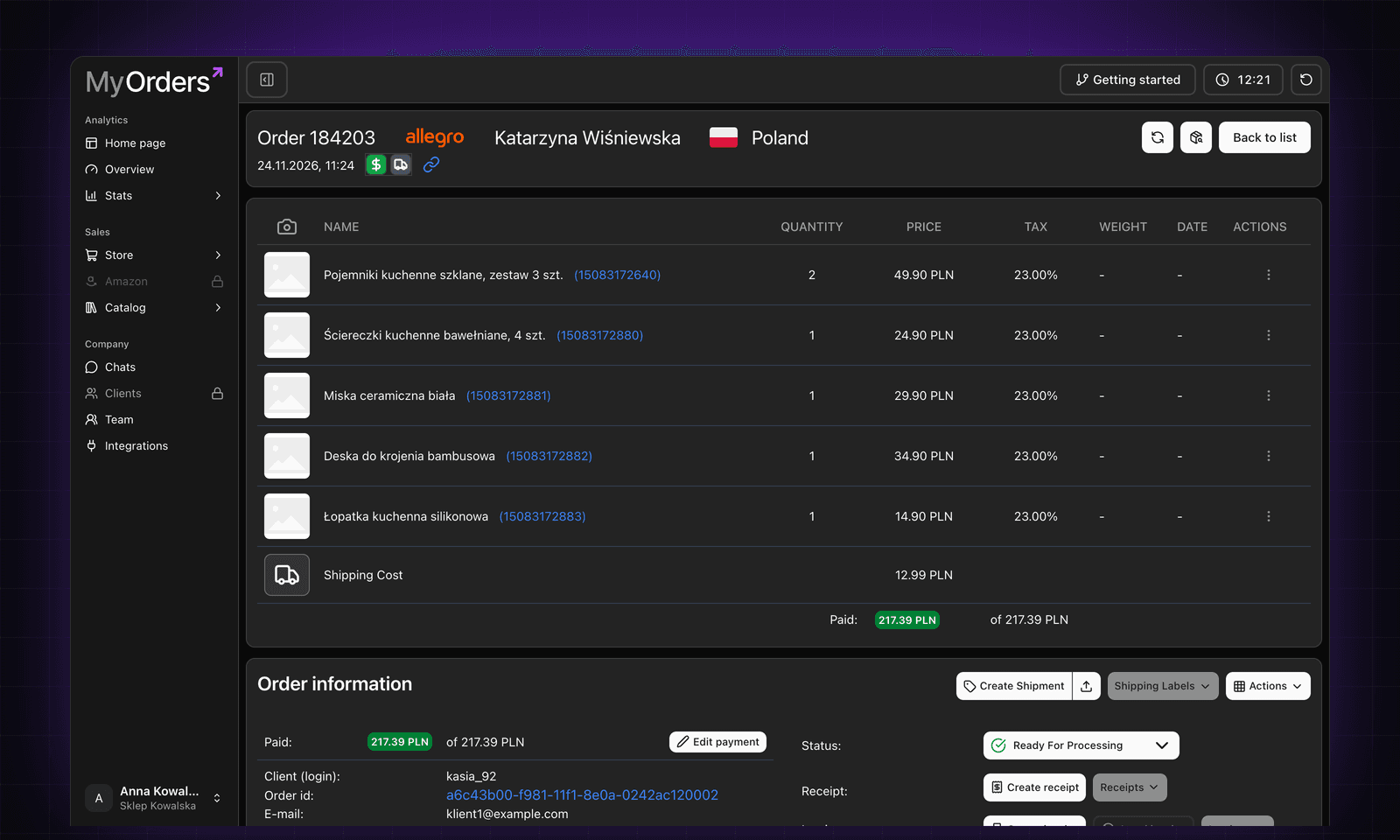
A buyer asks where the parcel is. Your colleague needs the order details now, not another search through tabs. MyOrders puts the buyer, products, payment and delivery together so your team can act with confidence.
Answer the buyer with the right context
The top of the order view identifies the order and buyer and presents its products. Quantities and product information help a colleague check what should be packed or confirm the contents when speaking to a customer. Status indicators provide useful context alongside the order header.
This is especially helpful when a customer has a question about one item in an order containing several products. Instead of relying on a forwarded message or a handwritten note, the person handling the request can look at the same order record used by the rest of the team.
Move from payment to dispatch
The order includes sections for payment, order information, actions, invoicing and delivery. Those details help the team understand the transaction before deciding on the next step. Update order information and payment using the controls in the order.
- Confirm the buyer and ordered products.
- Review payment and delivery information alongside the order.
- Use available document and shipping actions from the order view.
Keep follow-up work together
When an order has returns or shipment tracking information, the view can show those sections as well. Receipt and additional-information sections are also part of the layout. These details give staff a broader picture when a straightforward purchase becomes a follow-up, without assuming every order will have the same history or documents.
An order record is useful across several moments: before dispatch, when a buyer gets in touch, and when the team needs to check a document later. Keeping the relevant sections together makes it easier to pass a question to a colleague with the order as the shared reference.
Give every colleague a clear starting point
A clear order view helps reduce the small interruptions that accumulate during a busy day. The person answering a question can first check the buyer, items and payment, then move to delivery or documents as needed. The person preparing the parcel can start from the products and work toward fulfilment.
MyOrders keeps these pieces connected to the order, so owners and managers can build a consistent routine around a single record. That makes it easier to handle questions carefully while keeping everyday fulfilment moving.
The benefit becomes clearer during handovers. A colleague can open the same order and check the relevant section before taking over a customer request or a packing task. The shared record provides context for the conversation and reduces the need to repeat basic information about the transaction.
Picture a buyer asking about one item in a multi-product order. Open the record, identify the product and quantity, and check the delivery information. Your colleague can continue the conversation using the same details as the packing team.
At the packing table, the order brings together the items to collect and the delivery method. Payment information and the order status give the team context for the next step. Shipment and document controls sit alongside the transaction.
A shared record also makes a handover simpler. Tell a colleague which order needs attention; they can find the buyer, products and related sections in the same place. That keeps a small question from turning into a long search.
Give your team the full context at the moment it matters. With MyOrders, a customer question or packing task starts with a clear order record and a confident next step.